
Production Line #2: Volt Lines' Favorite Digital Products
We wrote this post to explain how the digital products we use every day at Volt Lines help us with our growth-related needs.

Hello! Burcu from Volt Lines here again. I hope you are closing out 2018 — or have closed it out — with some rather wonderful 2019 goals that you can genuinely find the motivation to pursue.
I came to the conclusion that some of the digital products we use every day at Volt Lines have proved themselves and are worth recommending publicly, so I thought I would write this post to explain how they help us with our immediate and growth-related needs on both the Product and the Business side, and what their pros and cons are. I hope these products will not be as universally familiar as the likes of Slack that we use every day, and that when you see innovative ideas of your own — the sort of "honestly, it would be pretty great if I could do such-and-such here" thought that crossed your mind once — already brought to life, you will feel a small flush of pride somewhere inside.
The three products we use most, all together, are these:
- Airtable — "Create workflows for your team by combining several pieces of functionality that could each count as a digital product in their own right."
- Notion — "Every need in a single product: write, plan, collaborate, get organised."
- Zapier — "Connect the products you use and create automated workflows."
Now let me go into a bit of detail.

1. Airtable
Product Hunt is a marvellous platform where you can browse the digital products listed on it and look for the solution you need. Eight or nine months ago, while looking on that platform for an alternative along the lines of "if only there were a flexible table structure like Google Sheets, so we could store some of our information in whatever format we wanted", I came across Airtable.

I signed up to try it out and had a look, and saw that they had built something like an advanced Excel — but if Excel is Bulbasaur in Pokémon, Airtable has become Venusaur, a good two evolutions further on. In other words they have not built something "like Excel"; they have gone well beyond it.
They have a feature called Blocks , which started out free and later became part of their revenue model. This feature lets you make any data set you have visible in whatever function and view you want. It has helped us enormously, from our sales forecast plans to our recruitment flows, and it let us produce variations before making the final call on how to display data that we open up again and again wondering how we could make better sense of it.
Pros — Airtable is tailor-made for processes that call for analytical thinking: it can establish meaningful relationships between different data sets; thanks to the Location block it can evaluate, against parameters you set, the houses near a location you have chosen while house-hunting; it can build charts and dashboards on top of pivot tables fed in real time; and thanks to remarkably advanced formula structures in a to-do list organised by status (take a look here at their forums, which are quite popular among their own users, and you can see how far they have taken formulas) you can do high-level planning. They also have Zapier integrations, which I will come to shortly.
Cons — As you might work out from its strengths, it is not a product built around words, so it will not be your first choice for things like note-taking or storing written information. Even so, whenever we need online, mobile-friendly, flexible tables that we can connect to a host of other products, Airtable is the first thing the team thinks of.
Bonuses:
- Templates is where they have covered Airtable's most common uses through ready-made templates.
- Table2Site is another product that lets you surface the information held in your Airtable tables as content on your websites.
2. Notion
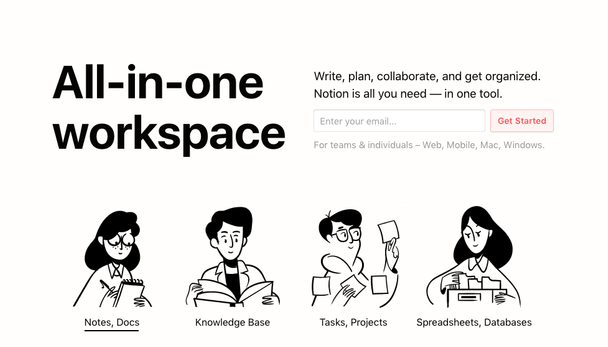
There is one thing I especially adore about Notion: everything speaks the same language, from the support team's avatars to the illustrations on the home page.
I have one favourite that everyone in the office would happily name: Notion. I discovered it browsing Product Hunt (Product Hunt, love finds those who love you…) at a time when I was thinking about how poorly suited Atlassian products like Jira are to souls chasing flexibility purely in order to work a notch more efficiently, and lamenting whether there was another product that was both budget-friendly and comfortable for the Engineering team to use while letting them keep the setup they were used to. Notion delivered much of the practicality I was looking for: planning, managing and tracking work by person, product, sprint and feature. Best of all is being able to design a huge, fluid process in which everyone across teams can effortlessly see what is going on in every sense.
Pros
- Blocks: as in Airtable, Notion has blocks too: the moment you type the "/" character on your keyboard, a list of the blocks you can create appears.
- Flexibility: Notion is the most flexible, most time-saving and most experience-focused product I have used to date — for a product manager who calculates the hypotenuse to cross the road while out walking, I would call it heaven. Being able to show the plans, documentation, test scenarios, subtasks, UX (user experience) flows and interfaces for a new feature we are adding to one of our products on a single page saves both me and the team days at a time. Especially when you are at war with a pile of urgent work, the beauty of being able to see in one click whether you have forgotten something somewhere, and what you were doing where, is something else entirely.
With Notion we started being able to build sprint dashboards that have improved out of all recognition. For a host of specific needs we can use different views of the same data set — calendar, list, table, kanban board — and manipulate those views with a wide variety of filters. On top of that, everyone on the team is able to build their own dashboard with whatever information they want in it, and every change made here syncs with everything else in Notion and updates there in real time.
- Writing capabilities: I would say Notion's editor is even better than Medium's; writing in a spotlessly clean interface, what is in your head flows out like a river. It is the same even when documenting an API structure — they even have a dedicated editor for Python and dozens of other programming languages.
The cons mostly consist of features they describe as "coming soon": they have no publicly available API and therefore no Zapier or Bitbucket integrations, and there are gaps around chart views and automatic coding for tasks — needs whose absence will upset engineering teams most. The reason for the "Coming Soon", I think, is that they did not anticipate teams like ours using the product, because as far as I remember, when I first saw it they were pushing features aimed at text-based lines of work. These days, from what I observe in the Facebook groups, the active users are either people using it as a personal planner or technology companies.

This is how I am waiting for Notion's public API and Frank Ocean's new album.
- Bonuses:
- “About us" pages are where they share the vision they are working towards, told as a story and in a creative way.
- They have a rapidly growing Facebook group . Users there share the templates they actually use, or knowledge gets passed along in the form of "how do I do this" / "here's how you could do it".
- This website is like a monument dedicated to Notion templates.
- 3. ZapierDo you remember IFTTT ? Zapier is in the same mould but leans towards producing solutions for work-related matters. Zapier has rescued us many times by solving very urgent needs that came out of nowhere. What it does, simply put, is this: it connects different digital products to one another and gets them to exchange information automatically, according to the steps and rules you define. It can turn a new sales leadfrom your website, a job application, or a general rating from your apps into an email that addresses the person by name via a Gmail integration; and, integrating with Airtable, Slack and Google Calendar, the moment there is a new database entry it can nudge Slack, update another entry in Airtable, and — if the Airtable entry passes a particular filter — send a calendar invitation from Calendar.Pros — With Zapier we are in a universe of possibilities with infinite outcomes. They can integrate with most of the leading digital products in use, anddowntimeis close to zero. Their support team works like lions too — they answered every absurd question of mine sincerely and showed that they were open to talking. Cons — If you need more than 20 automated flows, the USD/TRY exchange rate can make it painful. Even so, in urgent situations we choose it without hesitation on the logic of "let's put something together quickly with Zapier first, then build it ourselves later".Bonus:
- Visit these pages to check whether it can integrate with the products you use, and which other products would let you automate which of your manual processes.

We have reached the end of this glowing blog post, written with no financial interest whatsoever. Many thanks to you for reading this far without losing your motivation, and to the Notion, Airtable and Zapier teams for not leaving us stranded halfway.
Soon we will publish a new entry setting out what we focused on and what we did in the last quarter of 2018 — you can find it by following the Volt Lines blog.
I hope you spend — or spent — the last evening of 2018 as it deserves. Much love!